
Best Project Management Software for Small Teams in 2026


Small teams face a unique operational paradox. Fewer people means each person carries more responsibility, juggles more roles, and absorbs more context-switching costs. The wrong project management tool compounds this problem by adding administrative overhead instead of eliminating it.
The best project management software small teams adopt solves three specific problems: it reduces coordination friction without requiring dedicated project managers, scales affordably as headcount grows, and stays functional under real-world adoption conditions where not everyone checks the tool daily. Most small teams fail because their tools demand behaviors the team cannot sustain.
This analysis examines nine platforms through the lens of small team constraints: limited budgets, minimal onboarding time, and the reality that most team members will use the tool sporadically. Testing focused on free and entry-tier plans, not premium features small teams cannot afford or will not adopt.
Buy Now If:
- Your team needs shared task visibility immediately and free plans meet 80% of requirements.
- You operate with under $50 monthly software budget per team member.
- Onboarding new users must take under 15 minutes without dedicated training.
- Your workflows involve visual task tracking, basic dependencies, or simple collaboration.
Wait / Skip If:
- You require advanced resource allocation, portfolio management, or predictive analytics.
- Your team already struggles with tool adoption and needs mandatory usage enforcement.
- Complex approval chains, multi-level hierarchies, or audit trails are non-negotiable.
- You need platform-wide automation exceeding basic if-then triggers.
Why Small Team Project Management Differs Structurally
Small teams operate under constraints larger organizations never experience. Coordination overhead consumes a disproportionate share of available time. A five-person team dedicating one hour daily to status updates loses 20% of productive capacity to administrative tasks. Project management tools for small teams must reduce this overhead, not formalize it.

Three structural differences shape tool requirements. First, role fluidity. Small team members switch contexts frequently. A developer might handle customer support tickets between coding sprints. Marketing leads often double as project coordinators. Tools requiring rigid role assignments create friction. Second, adoption fragility. If one person abandons the tool, the coordination system collapses. Enterprise platforms survive partial adoption because formal processes force compliance. Small teams lack this enforcement mechanism. Third, budget sensitivity. Annual software costs that seem trivial per user become material expenses at small scale. A $15 monthly per-seat tool costs $900 annually for a five-person team.
Key Takeaways
- Adoption sustainability outweighs feature completeness for small team success
- Complexity kills adoption faster than missing features undermine productivity
- Tools requiring dedicated administration or rigid processes fail regardless of capabilities
- “This page decides, not teaches” principle applies to small team tool selection
How This Analysis Evaluated Tools
Testing simulated realistic small team scenarios. Each tool received three workflow trials: cross-functional product launch planning (five contributors across design, development, and marketing), recurring operational task tracking (weekly cycles with rotating responsibilities), and ad-hoc collaboration requests (unexpected urgent tasks requiring immediate coordination). Evaluation measured time-to-first-value (how quickly a new user could create and assign their first task), collaboration friction (steps required to update teammates on progress), and feature accessibility (what capabilities existed in free or entry-tier plans).
Four disqualifying factors emerged during testing. Tools requiring minimum seat purchases above actual team size failed affordability tests. Platforms where core functionality lived behind paywalls unreachable at small team budgets were excluded from primary recommendations. Systems demanding specialized training before basic task management became functional were noted as adoption risks. Tools showing clear degradation in usability as item count grew were flagged for scalability concerns.
Observed small team behavior patterns informed evaluation criteria. Most small teams check project tools once or twice daily, not continuously. Updates happen asynchronously across time zones or work schedules. Real-time collaboration features matter less than clear asynchronous communication. Notification systems must surface truly urgent items without creating alert fatigue. These usage realities shaped the evaluation framework more than feature checklists.
Selection Criteria for Small Team Tools
Five factors determine whether a project management tool actually works for small teams in practice. The selection framework prioritized these based on observed failure patterns.
Affordability threshold. Free plans must accommodate full team size with meaningful functionality, or paid plans must cost under $10 per user monthly. Small teams abandon tools when surprise costs emerge. The worst scenario involves teams outgrowing free plan limits after building workflows, then facing upgrade costs they cannot justify. This analysis weighted tools offering genuine long-term viability without forced upgrades.
Customization without complexity. Small teams need workflow flexibility because roles and processes shift frequently. However, customization that requires learning proprietary scripting languages or watching hour-long tutorials fails adoption tests. Customization must be immediately intuitive, such as drag-and-drop workflow builders or template modification without backend configuration. The best project management software small teams deploy balances flexibility with zero-configuration usability.
Collaboration that works asynchronously. Real-time features sound valuable but often go unused in small teams operating across schedules or time zones. Asynchronous collaboration capabilities matter more: comment threads that maintain context, automatic notifications when specific events occur, and clear task history showing what changed and why. Tools optimized for synchronous collaboration (screen sharing, live cursors, video integration) often underperform for distributed small teams.
Task management versus project management. Many tools claiming project management functionality actually offer task lists with collaboration features. True project management includes dependencies, critical path tracking, resource allocation, and timeline visualization. Small teams often need both capabilities. This analysis noted which tools excel at lightweight task coordination versus structured project planning, and whether both modes coexist effectively.
Visible progress without reporting overhead. Small teams lack dedicated project managers to generate status reports. Progress visibility must be automatic. At-a-glance dashboards, automatic progress calculations based on task completion, and visual timeline views matter more than customizable reporting engines. Tools requiring manual status updates or report generation fail under real-world small team usage.
Plaky: Free Full-Featured Option for Growing Teams
Plaky positions itself as unlimited project management without cost gates. The free plan includes unlimited users, unlimited boards, unlimited items, and all core views (Kanban, table, calendar, timeline). This removes the common small team constraint where free plans limit either team size or board quantity.
The platform uses a familiar board-item structure. Boards organize projects or ongoing work streams. Items represent individual tasks or deliverables. Customizable fields (status, priority, dates, assignments, tags, numbers, links) adapt to different workflow types without requiring technical configuration. Creating a functional workflow takes under five minutes. Small teams report this as a key adoption driver compared to platforms requiring extensive setup before becoming usable.
Collaboration happens through item-level comments, file attachments, and activity tracking. The activity log shows all changes automatically. Team members see who modified what and when without manual status updates. Bulk actions let users update multiple items simultaneously. For small teams managing recurring workflows, this eliminates repetitive manual updates.
In Short
- Comprehensive project management without free plan restrictions
- Functional workflows operational in under five minutes
- Unlimited users, boards, and items eliminate scaling costs
- Trade-off: fewer third-party integrations than established platforms
- Best for teams prioritizing internal coordination over external tool connections
Current Limitations in Free Plan
Private boards require paid plans. All boards remain visible to all workspace members in the free tier. Small teams handling sensitive projects or client work may need privacy controls unavailable without upgrading. Custom templates also require Pro or Enterprise plans. Teams must recreate workflow structures for each new board or copy existing boards as starting points.
The integration ecosystem remains limited compared to established platforms. Plaky connects with Clockify (time tracking) and Pumble (team communication) natively, but lacks direct connections to tools like Slack, Google Drive, or development platforms. For small teams already committed to extensive tool ecosystems, this creates workflow gaps.
Advanced automation capabilities live in paid plans. The free tier handles basic functionality but lacks conditional logic or multi-step automation sequences. Small teams with repeating manual processes may hit this ceiling faster than teams using Plaky for straightforward task tracking.
Pricing structure. Free plan includes everything mentioned above. Pro plan costs $3.99 per user monthly (billed annually) and adds private boards, custom templates, and bulk actions. Enterprise plan costs $8.99 per user monthly (annual billing) and includes board permissions, unlimited activity log, and advanced features. CAKE.com Bundle combining Plaky, Clockify, and Pumble costs $12.99 per user monthly.
Trello: Visual Workflow for Agile-Oriented Teams
Trello pioneered the card-based Kanban interface now ubiquitous in project tools. Its board-list-card hierarchy maps naturally to workflow stages. Cards move through lists representing progress states (backlog, in progress, review, complete). This visual approach works effectively for teams thinking in terms of work stages rather than task lists.
The platform’s strength lies in visual project roadmap execution. Roadmap initiatives appear as cards across timelines. Teams break initiatives into smaller cards on implementation boards. Power-Ups (Trello’s integration system) connect roadmap boards to execution boards so updates propagate automatically. This hierarchical structure suits product development teams coordinating strategy and execution.
Card customization includes checklists, labels, due dates, attachments, and custom fields (paid plans). Checklists within cards let users break tasks into sub-steps without creating separate cards. For small teams managing detailed workflows, this reduces board clutter. Comments and @mentions enable basic collaboration without leaving the card.
Trello’s AI writing assistant (Trello AI) helps draft, improve, or adjust comment text. This addresses a common small team friction point where non-native English speakers or less experienced writers hesitate to contribute written updates. However, the AI features require paid plans.
Key Takeaways
- Visual workflow representation suits teams tracking clear stage-based progress
- Kanban-centric design limits complex dependency management capabilities
- Simple workflows gain immediate value; complex projects encounter architectural constraints
- Free plan’s single Power-Up restriction severely limits integration capabilities
- Card-based interface becomes cluttered at 100+ tasks per board
Scalability constraints. Trello boards become cluttered as card count grows. A product development board tracking 100+ tasks across multiple sprints creates visual overload. The card-centric interface lacks built-in prioritization beyond manual list ordering or label systems. Teams report difficulty maintaining Trello organization as project complexity increases.
The free plan limits Power-Ups to one per board. This severely restricts integration capabilities for small teams needing to connect multiple tools. Calendar integration, timeline views, Gantt charts, and automation all require Power-Ups. The single Power-Up constraint forces tool-chain prioritization decisions that undermine the coordination problem Trello should solve.
Collaboration features work well for small synchronous teams but show friction for distributed asynchronous teams. Card comments lack threading, making extended discussions difficult to follow. Notification settings offer limited granularity. Users report either notification overload or missed updates.
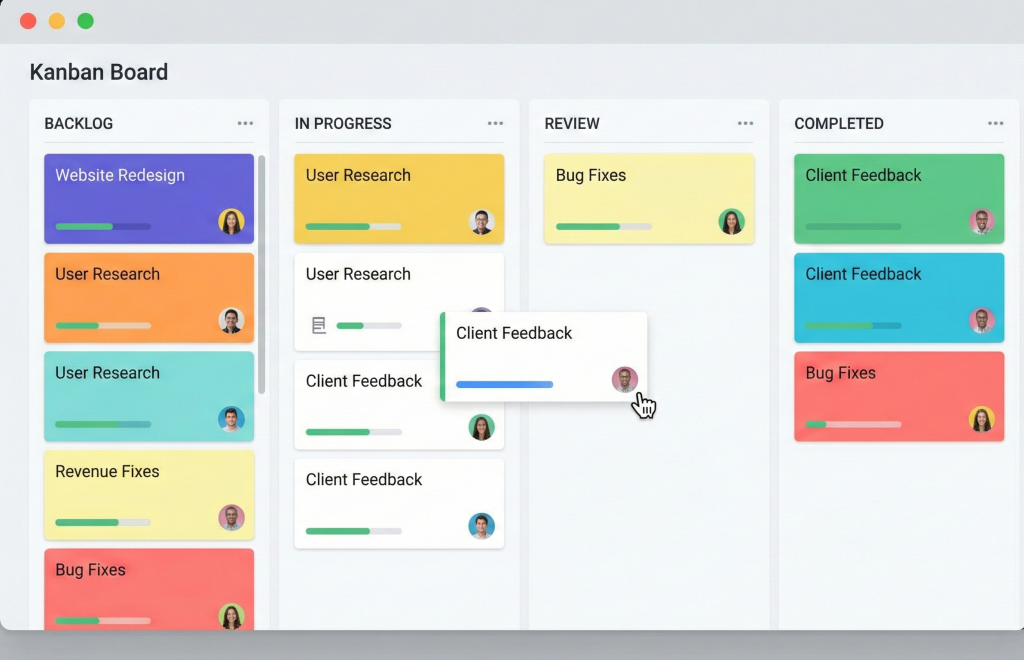
Pricing structure. Free plan includes unlimited cards, 10 boards per workspace, one Power-Up per board, 10MB file attachments, and unlimited activity log (two weeks). Standard plan costs $5 per user monthly (billed annually) and adds unlimited boards, advanced checklists, custom fields, and 250MB file attachments. Premium costs $10 per user monthly and includes timeline, dashboard, and calendar views plus advanced automation. Enterprise pricing varies based on requirements.
Smartsheet: Spreadsheet-Native Project Management
Smartsheet translates spreadsheet familiarity into project management functionality. Teams comfortable with Excel or Google Sheets adopt Smartsheet faster than unfamiliar interface paradigms. The grid view operates like spreadsheets with formulas, conditional formatting, and cell-based data entry. Additional views (Gantt, calendar, Kanban) render the same underlying data differently.
This architecture suits small teams where spreadsheets already drive workflows. Rather than abandoning familiar tools and learning entirely new systems, teams enhance existing spreadsheet processes with project management capabilities. Formula support allows sophisticated calculations including resource allocation, budget tracking, and schedule variance analysis directly within the grid.
The platform handles complex project management requirements often missing from task-focused tools. Dependencies link tasks with finish-to-start, start-to-start, finish-to-finish, or start-to-finish relationships. Critical path calculation automatically identifies schedule-critical tasks. Project baselines capture planned versus actual timelines, letting teams measure schedule variance without manual tracking. Resource management features allocate people to tasks and identify overallocation.
Collaboration happens directly in sheets. Multiple users edit simultaneously with real-time updates. Cell-level comments let teams discuss specific data points. Automated alerts trigger when specified conditions occur (deadlines approaching, values changing, assignments made). Approval workflows route sheets through multi-step review processes.
Bottom Line
- Spreadsheet paradigm suits teams already comfortable with Excel workflows
- Complex dependencies and resource planning integrate naturally
- Formula errors propagate throughout dependent calculations
- Steep learning curve for users unfamiliar with spreadsheet formulas
- Extensive upfront configuration required before functional project management
- Free plan severely limited; Pro plan minimum cost exceeds simpler alternatives
Formula dependency risks. Like spreadsheets, Smartsheet inherits formula error vulnerability. A single incorrect formula propagates errors throughout dependent calculations. Small teams lacking dedicated administrators may struggle debugging formula issues. This risk increases as sheet complexity grows. Teams report spending significant time troubleshooting broken calculations after workflow modifications.
Customization requires extensive upfront configuration. Creating functional project management systems in Smartsheet involves setting up sheets, defining formulas, establishing dependencies, configuring alerts, and building reports. This differs from tools offering pre-built project management workflows. Small teams must either invest significant setup time or purchase pre-built templates. The time-to-first-value substantially exceeds simpler platforms.
The free plan limits functionality severely. Two editor licenses restrict practical use to individual or pair workflows, not team collaboration. The Pro plan ($9 per user monthly for minimum three users) provides genuine team functionality but costs exceed budget-focused alternatives offering similar capabilities without spreadsheet complexity.
Pricing structure. Free plan includes one user, two editor licenses, and grid/calendar views. Pro costs $9 per user monthly (billed annually) and adds resource management, Gantt views, automations, and 20GB attachments. Business costs $19 per user monthly (three user minimum, annual billing) with advanced features including proofing, dynamic views, and premium support. Enterprise pricing requires contact.
monday.com: Workflow Automation at Scale
monday.com markets itself as a work operating system rather than solely project management software. The platform combines project tracking, workflow automation, and collaborative work management. Visual workflow builders let teams create processes spanning multiple boards without code.
The interface uses colored status columns, timeline views, and customizable dashboards. Teams build boards representing different work types (projects, clients, campaigns, products) then connect related boards. Cross-board automations trigger actions when conditions occur. This architecture supports complex workflows where tasks in one area automatically create or update items elsewhere.
Risk management capabilities distinguish monday.com from task-focused tools. Formula columns calculate risk scores based on probability and impact assessments. Conditional formatting highlights high-risk items automatically. The RAID log template (Risks, Assumptions, Issues, Dependencies) structures risk tracking systematically. Dashboard visualizations surface risk metrics without manual reporting.
Customization depth exceeds most competing platforms. Over 20 column types include status, numbers, timelines, dependencies, formulas, votes, and integrations. Board views include Kanban, calendar, timeline, Gantt, workload, and map. Teams configure columns, automations, and views to match specific workflow requirements.
In Short
- Sophisticated workflow automation suits teams willing to invest learning time
- Platform scales effectively as team complexity grows
- Free plan severely limited; meaningful functionality requires paid plans
- Three-seat minimum creates inefficiency for two-person teams
- Formula columns and automation builders demand multi-week learning curves
- Interface visual density overwhelms users accustomed to minimalist designs
Complexity versus capability trade-off. monday.com’s power creates learning overhead. Formula columns require understanding syntax and logic. Automation builders offer extensive options but demand thinking through trigger conditions and actions. Small teams report multi-week ramps before achieving productivity gains. This differs from tools offering immediate usability with less customization depth.
The interface presents visual density that some users find overwhelming. Boards display many columns simultaneously. Dashboards aggregate multiple widgets showing different data cuts. Notification settings require careful configuration to avoid alert overload. Teams accustomed to minimalist interfaces experience adaptation friction.
Pricing scales awkwardly for very small teams. The three-seat minimum means two-person teams pay for unused licenses. Per-user costs remain significant even at small scale. A five-person team on the Standard plan pays $60 monthly ($720 annually). This positions monday.com above budget-focused platforms despite offering greater capability.
Pricing structure. Free plan includes up to two seats, three boards, 200MB storage, and limited items. Basic costs $9 per user monthly (three seat minimum, annual billing) and adds unlimited items, 5GB storage, and basic integrations. Standard costs $12 per user monthly with timeline views, automations, and integrations. Pro costs $19 per user monthly adding time tracking, formula columns, and dependency management. Enterprise requires contact for pricing.
Wrike: Creative Collaboration Focus
Wrike targets creative and marketing teams with features supporting iterative review workflows. The platform combines task management with content collaboration, particularly feedback on visual assets.
File proofing capabilities set Wrike apart. Users upload design files, documents, or images directly to tasks. Reviewers annotate files with comments pinned to specific locations within the image or document. This eliminates the common workflow friction where feedback arrives through disparate channels (email, chat, phone calls) without visual reference points. Design iterations track changes between versions with side-by-side comparison.
The document editor integration lets users make minor changes directly from comments. This requires downloading a desktop editor but enables quick adjustments without leaving Wrike’s interface. For creative teams, this consolidates feedback and iteration in a single location.
Standard project management features include Gantt charts, dependencies, workload views, and custom workflows. Request forms capture incoming work requests systematically. Timesheets log time against tasks. The workload view visualizes team capacity and identifies overallocation.
Decision Snapshot
- Visual asset review workflow justifies platform for design-heavy teams
- Proofing features require Business plan ($25/user monthly, five seat minimum)
- $125 monthly minimum prices out budget-constrained small teams
- Workload management requires understanding effort allocation modes
- Five-seat minimum forces small teams to purchase unused licenses
- Integration capabilities mostly restricted to Business and higher plans
Workload management complexity. The workload view requires understanding effort allocation and task effort modes. Wrike offers fixed duration, fixed effort, and simple duration modes affecting how task scheduling responds to resource changes. Small teams report confusion setting this up correctly. The feature becomes powerful once understood but creates initial adoption friction.
The five-seat minimum on Business and higher plans forces small teams to purchase unused licenses. A three-person creative team pays for five seats ($125 monthly minimum) to access proofing features. This inefficiency compounds if team members work part-time or contractors contribute sporadically.
Integration capabilities matter for creative teams connecting design tools, storage systems, and communication platforms. Wrike offers 400+ integrations but many require Business or higher plans. Small teams on lower tiers cannot connect critical tools without upgrading beyond their budget.
Pricing structure. Free plan includes unlimited users, two GB storage, and basic task management. Team plan costs $10 per user monthly (two to 15 users, annual billing) adding Gantt charts, shareable dashboards, and integrations. Business costs $25 per user monthly (five to 200 users) with request forms, time tracking, and proofing. Enterprise and Pinnacle require contact for pricing.
Zoho Projects: Traditional Project Management Structure
Zoho Projects emphasizes formal project management methodology aligned with Waterfall approaches. The platform structures work around projects containing task lists, milestones, and time tracking. This differs from flexible board-based tools where structure emerges organically.
Dependency management supports all four dependency types: finish-to-start, start-to-start, finish-to-finish, and start-to-finish. Lag time between dependent tasks accommodates buffers or waiting periods. The Gantt chart visualizes dependencies with critical path highlighting. This level of dependency sophistication suits teams managing complex sequential workflows where task order matters critically.
Milestone tracking separates project phases distinctly. Teams define milestones representing major deliverables or decision points. Task lists organize under milestones. This hierarchical structure forces upfront planning but creates clear project phase visibility.
The Zia AI assistant helps with various tasks including content generation, message tone adjustment, and workflow recommendations. However, effectiveness varies. Industry reports suggest Zia works better for simple queries than complex project management advice.
Integration with Zoho Sprints enables hybrid project management. Teams using Zoho Projects for Waterfall planning and Zoho Sprints for Agile execution can coordinate both methodologies. This matters for small teams handling different project types simultaneously.
Key Takeaways
- Structured approach suits experienced project managers using traditional methodologies
- All four dependency types supported with lag time accommodation
- Critical path visualization and milestone tracking built-in
- Steep learning curve exceeds simpler alternatives
- Zoho ecosystem integration strong; third-party connections limited
- Interface complexity creates adoption barriers for non-specialists
- Minimum seat commitments required on paid plans
Integration ecosystem limitations. Zoho integrates extensively within the Zoho suite (CRM, Analytics, Books, etc.) but offers limited third-party connections. Small teams not committed to Zoho’s product ecosystem find this restrictive. Connecting external tools requires workarounds or middleware services.
The interface complexity creates adoption barriers. Users report needing tutorial videos to accomplish basic tasks that should be intuitive. For small teams where tool adoption depends on immediate usability, this friction undermines value. The platform assumes project management expertise that many small team members lack.
Pricing requires minimum seat commitments on paid plans. The Premium plan needs three users minimum. A two-person team must either use the limited free plan indefinitely or pay for unused licenses.
Pricing structure. Free plan includes three users, two projects, and 5GB storage. Premium costs €4 per user monthly (minimum three users, annual billing) with unlimited projects, custom fields, and advanced features. Enterprise costs €9 per user monthly adding resource utilization, custom roles, and Zia AI. Projects Plus requires contact for pricing.
Clockify: Time-Centric Work Management
Clockify approaches work management through time tracking rather than task management. The platform began as time tracking software then added project management features. This inverted architecture creates unique strengths and limitations.
Time tracking operates via timer or manual entry. Users start timers when beginning tasks and stop when finished. Alternatively, manual time entry logs work retroactively. Time data aggregates into timesheet views showing hours worked by project, task, or team member.
Project management features layer onto this time-centric foundation. Projects contain tasks. Users track time against specific tasks. Budget tracking compares estimated versus actual hours or costs. Billable rates apply to logged time for invoice generation.
The interface prioritizes simplicity over feature density. Creating projects and tasks requires minimal fields. Assigning work to team members uses straightforward dropdown selections. Progress tracking visualizes task completion automatically based on logged time versus estimates.
In Short
- Time tracking and billing integration suits freelance and consulting teams
- Simple interface prioritizes ease of use over feature density
- Free plan includes unlimited users and projects
- Lacks dependencies, critical path, and Gantt functionality
- Advanced features (forecasting, scheduled vs tracked time) require paid plans
- CAKE.com bundle addresses project management gaps via Plaky integration
Project management limitations. Clockify lacks dependencies, critical path analysis, and Gantt functionality in its core offering. Teams managing complex sequential workflows find these omissions restrictive. The platform also limits advanced features (project forecasting, scheduled versus tracked time comparison) to paid plans.
The free plan accommodates unlimited users and projects but restricts functionality. Billable rates, profit tracking, and project templates require paid plans. Small teams needing these capabilities must upgrade to Pro ($7.99 per user monthly) or higher tiers.
Integration with Plaky addresses project management limitations. The CAKE.com bundle combines Clockify’s time tracking with Plaky’s comprehensive project management and Pumble’s team communication. This multi-tool approach suits teams valuing specialized tools over all-in-one platforms.
Pricing structure. Free plan includes unlimited users, projects, and basic time tracking. Basic costs $3.99 per user monthly (annual billing) adding timesheet approvals and notifications. Standard costs $5.49 per user monthly with invoicing and expenses. Pro costs $7.99 per user monthly adding project forecasting and time auditing. Enterprise costs $11.99 per user monthly. CAKE.com Bundle combining Plaky, Clockify, and Pumble costs $12.99 per user monthly.
Asana: Integration-Driven Workflow
Asana positions as a work management platform focused on cross-team coordination. The interface organizes work into projects containing tasks. Tasks include descriptions, assignees, due dates, custom fields, and subtasks.
Over 200 integrations distinguish Asana from competitors. Native connections span communication (Slack, Microsoft Teams), file storage (Google Drive, Dropbox), development (GitHub, Jira), and dozens of specialized tools. This integration density lets small teams centralize coordination even when actual work happens in other platforms.
Automation rules (Asana’s terminology) create if-then workflows without code. Rules trigger actions when specified conditions occur. Examples include automatically assigning tasks when status changes, moving tasks between sections based on due dates, or sending notifications when high-priority items appear. Rules stack with integrations to connect automated actions across tools.
Bundles aggregate rules, fields, sections, and templates into reusable configurations. Teams create standardized workflow bundles then apply them to multiple projects. This ensures process consistency without recreating configurations repeatedly.
Portfolio views aggregate multiple projects for high-level visibility. Small teams managing several concurrent projects see progress across all work in unified dashboards. This addresses a common small team problem where coordination across projects happens ad hoc through meetings rather than systematic tracking.
Key Takeaways
- 200+ native integrations enable cross-tool workflow coordination
- Code-free automation rules create sophisticated if-then sequences
- Free plan accommodates 10 users with essential features
- Single assignee limitation undermines collaborative task execution
- Advanced features (timeline customization, workload management) require Business plans
- Subtle visual design preferences matter; some users prefer higher contrast
Single assignee limitation. Asana restricts task assignment to one person. Tasks requiring multiple collaborators need workarounds (subtasks, follower lists, or manual coordination). This creates friction for small teams where work often involves joint responsibility. The rationale centers on accountability clarity, but practical collaboration suffers.
The interface uses subtle visual design that some users find difficult to parse quickly. Status indicators, priorities, and progress markers use minimal color and iconography. Small teams preferring high-contrast visual feedback report lower satisfaction with Asana’s aesthetic compared to more colorful competitors.
Advanced features including timeline customization, workload management, and goal tracking require Business or Enterprise plans. These capabilities remain out of reach for budget-focused small teams on Starter plans.
Pricing structure. Personal plan is free for up to 10 users with unlimited tasks and projects. Starter costs $10.99 per user monthly (up to 500 users, annual billing) adding timeline views, workflow automation, and advanced search. Advanced costs $24.99 per user monthly with portfolios, goals, and workload management. Enterprise and Enterprise+ require contact for pricing.
ClickUp: Comprehensive Feature Density
ClickUp markets as the “everything app for work” combining task management, documents, goals, time tracking, and communication. The platform attempts comprehensive functionality under one interface.
Whiteboard capabilities support visual brainstorming. Teams create infinite canvases with sticky notes, shapes, connectors, and drawings. Whiteboards link directly to tasks, converting brainstorming into actionable work items. The AI image generation feature (paid plans only) creates visual mockups directly in whiteboards.
Hierarchical structure organizes work across nested levels: workspaces, spaces, folders, lists, and tasks. This architecture scales effectively as team complexity grows. Small teams start simple then add organizational layers as needed. However, the hierarchy creates complexity that simpler tools avoid.
The platform includes built-in chat functionality resembling dedicated communication tools. Channels organize team discussions. Direct messages enable private conversations. Chat integration with task management means conversations can create tasks or link to existing items without switching applications.
Autopilot Agents (paid plans) provide automated assistance including daily standups, reminders, and question answering based on workspace information. Effectiveness varies based on workspace data quality and query complexity.
Bottom Line
- Comprehensive feature set attempts tool consolidation
- Whiteboard brainstorming with AI image generation (paid plans)
- Built-in chat reduces need for separate communication tools
- Feature density creates significant learning overhead
- Free plan limits to five users; growth forces upgrades
- $7/user monthly for Unlimited plan approaches or exceeds simpler alternatives
- Resource management and reporting require paid plans
Complexity management challenges. ClickUp offers extensive customization including dozens of field types, multiple view options, and sophisticated automation builders. This flexibility enables precise workflow matching but requires understanding ClickUp’s conceptual model. Small teams without dedicated administrators struggle maintaining organized workspaces as complexity grows.
The free plan limits to five users, restricting scalability. Growing beyond five people forces plan upgrades. At $7 per user monthly for Unlimited, costs approach or exceed competing platforms with simpler interfaces and lower learning curves.
Resource management and advanced reporting require paid plans. Small teams needing capacity planning or detailed analytics face upgrade pressure regardless of overall feature utilization. This creates inefficient scenarios where teams pay for comprehensive functionality but use limited subsets.
Pricing structure. Free plan includes up to five users with unlimited tasks, 100MB storage, and basic features. Unlimited costs $7 per user monthly (annual billing) adding unlimited storage, guests, integrations, and dashboards. Business costs $12 per user monthly with timelines, workload, and Google SSO. Enterprise requires contact for pricing.

When Small Teams Need Different Solutions
The tools above address mainstream small team needs, but specific scenarios require alternative approaches.
Industry-specific workflows. Software development teams often need deeper integration with development tools (version control, CI/CD, issue tracking). Generic project management platforms layer onto development workflows awkwardly. Teams in this situation benefit from development-centric tools like Linear or specialized plugins for general platforms.
Construction, healthcare, and professional services industries face compliance requirements that general project management tools cannot address. These teams need vertical-specific solutions built around their regulatory frameworks and workflow norms. Attempting to force-fit general tools creates workarounds that undermine the coordination benefits project management should provide.
Extreme budget constraints. Some small teams operate with zero discretionary software budget. Open source solutions like Taiga or OpenProject eliminate licensing costs entirely but require technical setup and self-hosting. This trades software costs for infrastructure and maintenance overhead. Very small teams with technical capability sometimes prefer this trade-off.
Client-facing project collaboration. Teams coordinating extensively with external clients or contractors need client access controls, branded client portals, and guest user management. Many general tools charge per guest or limit external collaboration features. Platforms like Teamwork or Basecamp structure pricing and features around client-facing work more effectively.
Hybrid tool strategies. No single platform excels at all aspects of work management. Small teams often benefit from purpose-built tools connected via integrations. Time tracking in Clockify, project management in Plaky, communication in Pumble, and documentation in Notion connected via automation creates specialized excellence versus compromised all-in-one solutions. The CAKE.com bundle represents this philosophy for project coordination specifically.
Common Small Team Migration Mistakes
Small teams switching project management tools frequently make predictable errors that undermine adoption.
Migrating during active project work. Tool transitions during critical project phases create maximum disruption. Mid-project migrations force teams to maintain dual systems temporarily or accept data loss on in-flight work. Migration during natural project boundaries (between projects, fiscal year transitions, or planned downtime) reduces friction substantially.
Feature-driven selection over adoption-driven selection. Teams choose tools based on comprehensive feature lists rather than features they will actually use consistently. The best project management software small teams select matches their actual behavior patterns, not theoretical ideal behaviors. A tool with 90% of needed features that everyone uses daily outperforms a tool with 100% of features that half the team abandons.
Insufficient migration planning. Small teams underestimate time required to configure new tools, migrate data, train users, and establish new workflows. Migration projects competing for time with ongoing work get deprioritized. Successful migrations allocate dedicated time and assign clear ownership. The tool transition becomes a project requiring management itself.
Abandoning incumbent tools too quickly. Teams expect immediate productivity gains from new tools. When initial friction emerges, teams retreat to previous systems, cementing failed migration narratives. Successful transitions set realistic adoption timelines (weeks or months) and enforce new tool usage even during uncomfortable adaptation periods.
Evaluation Framework for Tool Selection
Small teams selecting project management software should assess options systematically across five dimensions.
Usage pattern alignment. How frequently will team members actually check the tool? Daily continuous collaboration demands different features than once-daily asynchronous updates. Does the tool match actual check-in patterns or require changing established behaviors?
Adoption sustainability. Can new team members start contributing within one session or does onboarding require hours of training? Will the tool remain functional if one person stops using it or does coordination collapse without universal adoption?
Growth trajectory accommodation. How does pricing and functionality change as team size increases? Do critical features lock behind paywalls at specific size thresholds? Can the tool scale smoothly or will growth force disruptive migrations?
Workflow flexibility versus structure. Does the team benefit from enforced process structure or need fluid workflow adaptation? Highly structured tools work well for teams with established methodologies but create friction for teams with evolving processes.
Total cost of ownership. Beyond license costs, what’s the ongoing administration time required? Do integrations eliminate or create additional work? Does the learning curve tax productivity enough to offset coordination gains?
Long-Term Considerations for Tool Selection
Short-term needs often dominate tool selection, but multi-year implications matter significantly.
Data portability. Some platforms make data export difficult or limit export functionality to specific plan tiers. Small teams growing into new tools later face data migration challenges if export capabilities don’t exist. Evaluation should include export format review and migration path understanding from day one.
Vendor stability and acquisition risk. Project management tools get acquired frequently. Acquisitions often lead to pricing changes, feature elimination, or platform consolidation that disrupts established workflows. While impossible to predict perfectly, evaluating vendor financial stability and acquisition likelihood reduces surprise disruption.
Feature development trajectory. Some vendors iterate rapidly adding features regularly. Others maintain stable feature sets with minimal changes. Teams should understand whether they prefer stability or continuous evolution based on their capacity to adapt to changes.
Support quality and responsiveness. Small teams lack dedicated IT support to troubleshoot technical issues. Vendor support quality becomes critical for resolving problems quickly. Support evaluation should include response time testing, documentation quality review, and community forum activity assessment.
Conclusion
One-line verdict: Plaky delivers the most practical balance of capability, cost, and adoption ease for small teams across industries and workflows.
Value-for-money score: 8.7/10

