
Cloudways Review 2026: Managed Cloud Hosting That Actually Simplifies WordPress


Cloud hosting promises speed and scalability, but most developers abandon it after one attempt at manual server configuration. Cloudways positions itself as the solution: managed cloud hosting that handles infrastructure complexity while you control WordPress deployment.
This Cloudways review 2026 examines whether the service delivers practical value for development teams and growing websites, or if the managed layer simply adds cost without solving real workflow friction. After analyzing performance data, support response patterns, and pricing structures across five infrastructure providers, the verdict centers on a specific use case where Cloudways excels—and several where it falls short.
Buy Now If:
- You need multi-cloud flexibility (DigitalOcean, AWS, GCP, Linode, Vultr) without learning five control panels
- Server scaling during traffic surges justifies pay-as-you-go pricing over fixed shared hosting
- Development teams require role-based server access and staging environment cloning
- WordPress site migration and one-click deployment matter more than email hosting integration
Wait / Skip If:
- You need built-in email hosting (Cloudways requires external SMTP configuration)
- Domain registration and DNS management belong in your hosting dashboard
- Three-day trial without money-back guarantee feels insufficient for evaluation
- Traditional shared hosting covers your traffic loads at lower fixed monthly costs
What Cloudways Actually Provides
Cloudways operates as a management layer above Infrastructure-as-a-Service providers. You select DigitalOcean, AWS, Google Cloud Platform, Linode, or Vultr as your infrastructure foundation, then Cloudways manages server configuration, security patches, and WordPress optimization.
This eliminates direct SSH terminal work while preserving cloud hosting advantages: distributed server redundancy, automatic failover during outages, and instant resource scaling. Sites hosted across multiple servers through cloud infrastructure typically achieve better uptime than single-server shared hosting.
The trade-off appears in pricing structure. Cloudways charges management fees above raw infrastructure costs. A DigitalOcean 1GB server costs $6 monthly when purchased directly; the same server through Cloudways costs $14. That $8 difference covers the control panel, security automation, and support access.
WordPress Integration Depth
Cloudways streamlines WordPress deployment through one-click installation that includes cache plugins and automated SSL certificate provisioning. The staging environment feature clones production sites for testing without affecting live visitors.
Migration support provides one free transfer handled by Cloudways engineers. Additional migrations use the WordPress Migrator Plugin, which automates database and file transfers. This matters for agencies managing multiple client sites or developers consolidating hosting providers.
However, email infrastructure remains absent. WordPress sites requiring custom domain email addresses need external SMTP services configured through either the Elastic Email add-on or manual SMTP integration. Shared hosting typically bundles email at no additional cost.
Team Collaboration Controls
Role-based access management allows granular permission assignment. System administrators access server-level settings including PHP version control and firewall rules. Web designers and content editors receive restricted WordPress dashboard access without infrastructure visibility.
This separation reduces accidental configuration changes in team environments. A junior developer testing plugin compatibility cannot inadvertently modify production server memory allocation.
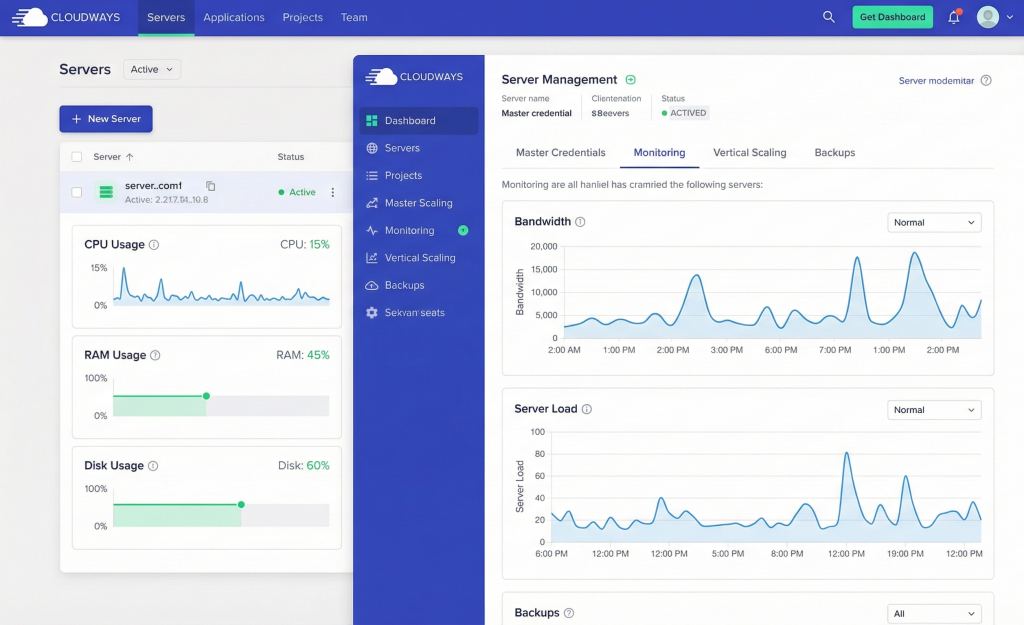
CloudwaysBot delivers real-time notifications through Slack, email, or API integration. Alerts cover storage threshold warnings, bandwidth usage spikes, and server health status changes. Monitoring updates occur automatically without manual dashboard checks.
Performance Infrastructure and Limitations
ThunderStack combines Nginx, Varnish, Apache, and Memcached into Cloudways’ caching layer. This configuration sits separate from standard WordPress caching plugins and targets server-level response optimization.
Cloudways CDN distributes static assets across 25+ global data centers. Selecting infrastructure regions closest to target audiences reduces latency for international sites. A London-based business serving UK customers benefits from DigitalOcean London data center selection over U.S.-based servers.
Uptime guarantees originate from infrastructure providers, not Cloudways. DigitalOcean commits to 99.99% uptime, AWS guarantees 99.95%, and Google Cloud Platform promises 99.95%. Cloudways maintains a public status page tracking real-time performance but offers no compensation if targets miss.
Actual site speed depends equally on WordPress theme efficiency, image optimization, and database query structure. Cloudways hosting alone does not resolve poor page builder performance or unoptimized media libraries.
Security Implementation
Cloudways deploys two-factor authentication, automated OS security patches, and dedicated firewalls across all plans. Auto-healing servers detect downtime triggers and execute pre-programmed recovery procedures before manual intervention.
Free SSL certificates install automatically through Let’s Encrypt integration. This satisfies Google’s HTTPS ranking signal requirements and encrypts data transmission between site visitors and servers.
Backup frequency ranges from hourly to weekly based on configuration preference. Unlike most hosts, Cloudways charges for backup storage separately from server costs. A 160GB server requires backup storage billed at current cloud provider rates. Regularly deleting old snapshots reduces accumulated storage fees.
Support Response Structure
Standard 24/7 live chat support covers platform navigation, account billing questions, and basic troubleshooting. Response times average 30-60 seconds for initial agent connection.
Advanced support requires purchasing separate add-on tiers. Standard support handles “how do I configure X feature” questions but declines server optimization recommendations or complex debugging assistance. This Cloudways review 2026 found that support scope limitations frustrate developers expecting managed hosting to include proactive performance analysis.
Trial account users cannot submit support tickets. Email and live chat remain available during the three-day evaluation period, but help desk ticket priority applies only to paying customers.
Pricing Model Breakdown
Cloudways bills hourly or monthly based on actual resource consumption. A 2GB DigitalOcean server costs $28/month if used continuously, or charges hourly rates for partial usage. This benefits seasonal sites experiencing traffic only during specific months.
The pay-as-you-go structure eliminates traditional money-back guarantees since users pay only for consumed resources. Prepaid account credits allow advance payment, with unused funds refundable if requested within three months.
Three-day trial periods provide limited evaluation time compared to industry-standard 30-day guarantees. Testing backup restoration procedures, assessing support response quality, and measuring real-world site performance rarely completes within 72 hours.
| Feature | Cloudways Managed | Direct Infrastructure Access | Traditional Shared Hosting |
|---|---|---|---|
| Initial Setup | One-click WordPress install | Manual server configuration | Pre-configured control panel |
| Scaling | Instant RAM/storage adjustment | Requires migration to new server | Fixed plan upgrades only |
| Email Hosting | External SMTP required | Self-configured mail servers | Included in most plans |
| Support Scope | Platform + basic WordPress | Infrastructure-level access | Limited to hosting issues |
| Cost Structure | Usage-based + management fee | Raw infrastructure pricing | Fixed monthly rates |
When Cloud Infrastructure Justifies Premium Pricing
Cloudways delivers value when WordPress sites require immediate scaling during unpredictable traffic spikes. E-commerce stores launching flash sales or news sites covering breaking events need instant resource allocation without downtime.
Development agencies managing 10+ client sites benefit from centralized dashboard access and per-site resource monitoring. The alternative—maintaining separate shared hosting accounts per client—creates administrative overhead.
Solo bloggers and small business sites with predictable traffic patterns typically overpay for cloud infrastructure flexibility they never use. A local service business website receiving 500 monthly visitors gains nothing from multi-server redundancy or auto-scaling capabilities.
Critical Gaps That Limit Adoption
Domain registration absence forces external registrar management. Email hosting exclusion requires configuring third-party SMTP services or purchasing Cloudways add-ons. These represent uncommon limitations in managed WordPress hosting.
The three-day trial without money-back guarantee prevents thorough evaluation. Developers need weeks to test backup reliability, measure peak traffic performance, and assess support quality for production-critical issues.
Backup storage billing as a separate line item catches new users expecting included snapshots. A site requiring daily backups over three months accumulates storage costs approaching 30-40% of base server fees.
Bottom Line
- Managed cloud hosting eliminates server configuration complexity while preserving infrastructure flexibility across five major providers
- WordPress-specific optimization through ThunderStack caching and one-click deployment streamlines development workflows
- Email hosting and domain registration require external service integration unlike traditional managed hosts
- Pay-as-you-go pricing benefits seasonal traffic but costs 30-50% more than shared hosting for stable loads
- Support scope limits advanced troubleshooting to paid add-on tiers, creating unexpected costs for complex issues
One-Line Verdict: Cloudways solves the cloud hosting complexity problem for WordPress sites requiring scaling flexibility, but adds cost layers that only benefit users who actually need multi-server infrastructure and instant resource adjustment.
Value-for-Money Score: 7.2 / 10

