
Migrating a Website to New Hosting Without Losing Email: What Actually Breaks

Successfully migrating a website to new hosting without losing email requires separating DNS updates from web server file transfers. Direct server cutovers frequently drop incoming mail because domain nameservers change before destination mailboxes exist. Maintaining zero email downtime requires pre-creating identical accounts on the destination host, lowering DNS Time-to-Live values, and synchronizing IMAP data prior to switching MX records.
Migrate Email First If:
- Your business relies on continuous incoming mail during business hours.
- You use cPanel, Plesk, or direct IMAP connections hosted on the same server as your website files.
- You are changing both domain nameservers and web hosting providers simultaneously.
Skip Direct Cutover If:
- Your email is hosted separately on Google Workspace or Microsoft 365 (MX records only need pointing, mailboxes remain untouched).
- You have not reduced your DNS TTL (Time to Live) settings 48 hours before starting the transfer.
Decoupled IMAP Sync & Staged MX Cutover
This procedure separates mailbox data synchronization from web asset transfers. It eliminates missed emails across Linux and Windows server environments without requiring service suspension.
When migrating a website to new hosting without losing email, administrators must plan DNS TTL reduction carefully. Moving site files without preparing mail accounts causes severe communication disruptions.
Why Email Breaks During Site Migration (DNS & MX Record Mechanics)

Email delivery relies on Mail Exchanger (MX) records within the Domain Name System (DNS). When a sender transmits an email, their outbound server queries your domain’s DNS to find the designated mail server IP address.
If you change your nameservers to point to a new web host before setting up mailboxes on that new server, incoming mail bounces. Senders receive ‘550 User Unknown’ or ‘Connection Refused’ error messages. According to RFC 5321 SMTP specification documents, mail servers attempt retries based on local queue rules, but misconfigured destination targets often result in immediate hard bounces.
The root cause of email loss during host transfers is cached DNS data. Nameserver updates do not propagate instantly across global ISPs. Senders will continue querying old server IPs for hours or days if the Time to Live (TTL) value remains high.
Downsides and Practical Limitations of Manual Mail Cutovers
While a staged email migration prevents lost messages, it introduces specific technical and operational constraints that administrators must accommodate.
First, dual-hosting overlap costs are unavoidable. You must maintain active paid subscriptions on both the source and destination hosting accounts for at least 72 hours. Terminating the old host prematurely causes queued incoming mail to bounce off offline servers.
Second, password re-authentication creates temporary user friction. Client mail software such as Outlook, Apple Mail, or Thunderbird often flags security certificate mismatches when server IP addresses shift. End users must manually update incoming and outgoing server hostnames in their local email clients.
Not for you if you use a third-party hosted mail service like Google Workspace or Microsoft 365. For external mail providers, moving your website hosting only requires copying website files and keeping your existing MX records intact at your new DNS zone file.
Step-by-Step Method for Migrating a Website to New Hosting Without Losing Email
Following a structured approach for migrating a website to new hosting without losing email eliminates inbox downtime completely. Execute these four distinct phases in sequence.
Phase 1: Lower DNS TTL Values
Log into your domain registrar or active DNS manager 48 hours prior to the planned migration. Locate the Time to Live (TTL) setting for your MX records and A records. Reduce the TTL value from the default (typically 86400 seconds or 24 hours) down to 300 seconds (5 minutes). According to Cloudflare DNS documentation, lowering TTL forces internet service providers to query your authority server frequently, accelerating post-cutover updates.
Phase 2: Replicate Mail Accounts on the Destination Server
Create every existing email address on the new host before altering any domain settings. Ensure that mailbox names, aliases, forwarders, and passwords match the source host configuration exactly. If an incoming message arrives at the new server before an account exists, the server rejects the connection.
Phase 3: Synchronize Historical IMAP Data
Use an automated sync tool such as IMAPSync or built-in host migration utilities to mirror inbox folders, sent items, and custom archives. System administrators who regularly perform migrating a website to new hosting without losing email recommend lowering DNS TTL 48 hours beforehand and performing an initial bulk IMAP copy one day prior to switching DNS.
Phase 4: Update MX Records and Perform Final Delta Sync
Update your DNS zone file to point MX records to the new host’s mail server address. Because TTL was reduced in Phase 1, global resolvers recognize the new mail server within minutes. Wait 24 hours, then execute a final delta IMAP sync to pull any rogue messages that landed on the old server during the propagation window.
Comparison of Email Migration Procedures
Selecting the correct migration tool depends on your server access level and control panel environment. The primary challenge when migrating a website to new hosting without losing email is managing the propagation window of MX records.
| Migration Method | Free vs Paid Tier | Key Features | Resource Usage | Supported OS |
|---|---|---|---|---|
| cPanel Full Backup Transfer | Free (Built-in) | Automates website, MySQL, and full email account migration | High CPU spikes during archive extraction | Linux (CentOS, AlmaLinux) |
| Manual IMAPSync Protocol | Free Open Source | Copies mail directory structures across disparate servers | Low memory, persistent network bandwidth | Linux, Windows, macOS |
| Host Automated Migration Script | Free with Hosting | One-click database and mailbox cloning via API | Server-managed background task | Cross-platform web UI |
| Plesk Site Import Extension | Free (Built-in) | Pulls website files and mail server settings over SSH | Moderate server load | Linux, Windows Server |
Strengths of Decoupled Migration
- Zero loss of incoming business communication during DNS cutover.
- Protects historical folder hierarchies and read/unread status flags.
- Allows rollback to old host if site files fail on the new server.
Limitations of Decoupled Migration
- Requires duplicate user management on both servers during transition.
- Demands manual DNS editing and TTL tracking across multiple dashboards.
Key Takeaways
- Reduce DNS TTL to 300 seconds 48 hours before altering nameservers.
- Pre-create identical email mailboxes and passwords on the new host server.
- Use IMAP protocol synchronization to copy existing mail directories prior to cutover.
- Perform a secondary delta IMAP sync 24 hours after updating MX records.
- Verify SPF, DKIM, and DMARC TXT records on the new DNS zone immediately.
Troubleshooting Common Post-Migration Email Failures
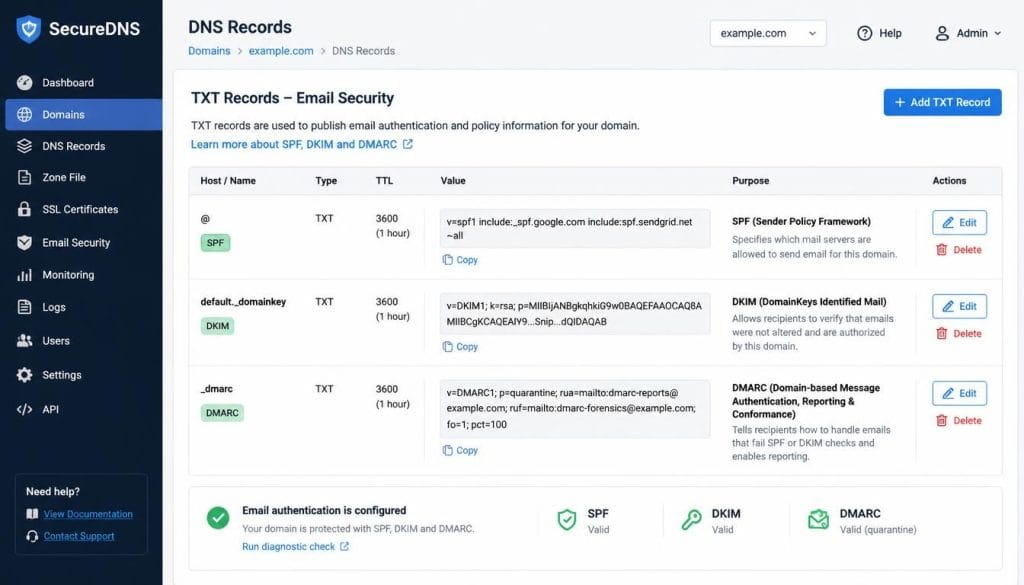
Even structured migrations encounter edge cases. Understanding post-cutover failure patterns allows rapid remediation without data loss.
Spam Flagging and Authentication Drops (SPF / DKIM / DMARC)
When email routes through the new server, recipient servers inspect SPF (Sender Policy Framework) and DKIM (DomainKeys Identified Mail) signatures. If your new host IP is not authorized in your domain’s SPF TXT record, messages land in spam folders or get outright rejected.
Update your SPF record immediately to include the new host’s network block. Generate a new DKIM keypair inside your new web control panel and insert the corresponding TXT record into your active DNS manager.
Authentication Loops on Local Clients
Desktop clients like Outlook may continuously prompt for passwords after server migration. This happens when the local client attempts to reuse old SSL security certificates associated with the former web host. Clearing the saved client credentials in Windows Credential Manager or macOS Keychain and updating the server hostnames resolves the loop.
By validating mailbox sync before updating domain nameservers, migrating a website to new hosting without losing email becomes a routine maintenance task.
Frequently Asked Questions About Email Host Cutover
Does changing my website hosting affect my Google Workspace email?
No. Google Workspace hosts email on Google servers, independent of your web host. When moving your website, only update your domain’s A records or web host nameservers. Ensure your Google MX records (pointing to SMTP.GOOGLE.COM) remain unchanged in your active DNS manager.
How long should I keep my old hosting account active after migrating?
Maintain your old hosting subscription for at least 72 hours following DNS updates. This overlap ensures that lingering email traffic routed via slow-updating ISP caches is safely received on the old server and captured during your final delta sync.
What is the difference between POP3 and IMAP during a migration?
POP3 downloads emails directly to a single local device and removes them from the host server. IMAP stores messages and folder structures directly on the server. If your accounts use POP3, historical emails reside safely on your computer, but new incoming messages will require identical account creation on the new host server.
Verdict and Value Assessment
Decoupling email account creation and data synchronization from web server transfers is the only reliable way to prevent dropped business communications.
One-Line Verdict: Staging mailboxes and lowering DNS TTL values prior to changing nameservers guarantees zero dropped mail during hosting migrations.
Value-for-Money Score: 9.2 / 10