
VPN Slow on Wi-Fi But Fast on Mobile Data: What’s Actually Happening

Observing a VPN slow on Wi-Fi connection while mobile data speeds remain blazingly fast is a surprisingly common technical bottleneck. Users frequently assume the virtual private network service itself is failing when desktop or phone connections drop on home wireless, yet the identical tunnel flies over 5G or LTE. In reality, encrypted network packets interact very differently with local wireless routers than they do with cellular towers.
Try Local Router Tweaks First If:
- Your VPN speeds drop drastically only on home wireless networks while mobile hotspot speeds remain high.
- Speed tests show high latency or packet loss specifically when connected to a 2.4 GHz or 5 GHz band.
- The connection stabilizes immediately after toggling off local network scanning or custom DNS settings.
Skip to Protocol Reconfiguration If:
- The slowdown happens across all wireless networks, including public hotspots and friend home routers.
- Your router firmware is restricted by your Internet Service Provider and prevents manual MTU adjustments.
- Disconnecting from the wireless network entirely and using direct Ethernet cables yields no speed recovery.
Root Causes of a VPN Slow on Wi-Fi Setup
The core difference between wireless networks and cellular carriers lies in how they manage transport packet framing. Encrypted tunnels add extra security header data to every single packet transmitted. When a home router receives these enlarged frames, it may exceed the maximum transmission unit allowance, causing excessive packet splitting.
According to IEEE 802.11 wireless packet fragmentation specifications, local radio interference forces frequent frame retransmissions. When encrypted packets split across multiple wireless frames, the destination device must wait for every fragment to reassemble. If a single radio frame drops due to physical obstacles, the entire encrypted payload fails inspection and demands retransmission, creating a severe bottleneck that never appears on cellular networks.
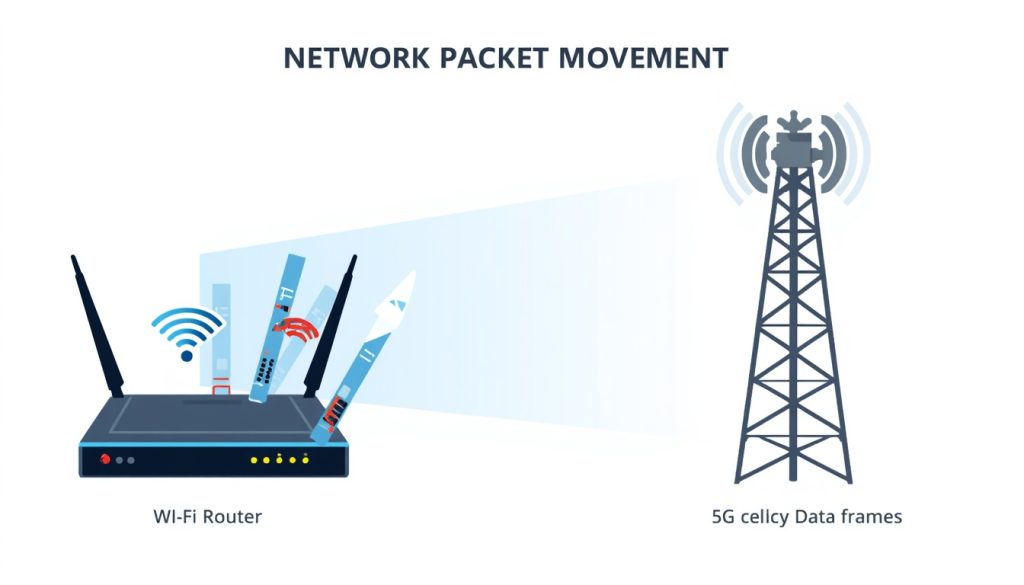
Cellular networks utilize aggressive Maximum Transmission Unit (MTU) discovery alongside MSS clamping (Maximum Segment Size adjustments) at the tower level. Mobile towers automatically resize incoming TCP segments to fit the cellular payload limits. Home routers, by contrast, rely on fixed default settings that frequently clash with active encryption overhead.
Diagnosing Network Bottlenecks Between Cellular and Local Networks
When investigating a VPN slow on Wi-Fi scenario, examining local hardware processing constraints is essential. Budget wireless routers feature underpowered microprocessors responsible for NAT translation, firewall inspections, and wireless encryption headers simultaneously. Pushing encrypted VPN traffic through an already stressed router CPU increases queue latency, colloquially known as bufferbloat.
WireGuard Protocol Over UDP Port 51820
WireGuard offers lean code architecture operating directly within kernel space for minimal CPU overhead. Its modern cryptography handling eliminates MTU fragmentation issues across restrictive local wireless hardware while maintaining full throughput capabilities.
Mobile networks bypass domestic hardware limitations by offloading packet framing to dedicated baseband processors. Additionally, mobile operators implement sophisticated traffic shaping engines designed to optimize real-time streaming data. According to Google Android developer networking documentation, modern mobile operating systems negotiate dynamic socket buffers directly with baseband modems to prevent queue starvation.
Hardware vs Protocol Rules: Performance Comparison
Different tunnel protocols handle packet framing variations with distinct efficiency levels when operating over home radio frequencies versus cellular towers.
| Tunneling Protocol | Free vs Paid Tier | Key Features | Resource Usage | Supported OS |
|---|---|---|---|---|
| WireGuard | Open Source (Free) | Lightweight code, state-of-the-art crypto, instant roaming | Extremely Low CPU | Windows, macOS, Linux, iOS, Android |
| OpenVPN (UDP) | Open Source (Free) | Highly configurable, broad router support, robust security | Moderate CPU | Cross-platform, embedded router OS |
| OpenVPN (TCP) | Open Source (Free) | Bypasses strict firewalls, reliable transport checks | High CPU / Memory | Cross-platform |
| IKEv2 / IPsec | Proprietary / Open | Fast reconnection during network transitions, low latency | Low to Moderate CPU | iOS, macOS, Windows native support |
Choosing between modifying local hardware environments or adjusting client protocols depends entirely on administrative access to your home networking equipment.
Advantages of Protocol Adjustment
- Requires zero physical changes to ISP hardware or router admin consoles.
- Applies across all external wireless hotspots automatically.
- Directly addresses underlying packet fragmentation without network reboots.
Limitations of Protocol Adjustment
- May require testing multiple open ports to bypass local ISP inspection.
- Legacy hardware may lack native kernel support for modern WireGuard implementations.
- Does not eliminate physical radio interference caused by neighboring 2.4 GHz channels.
Step-by-Step Fixes for Local Wireless VPN Degradation
Resolving situations where a VPN slow on Wi-Fi issue degrades performance requires systematic tuning of client software settings alongside router configurations. Industry benchmarks published in WireGuard protocol security and performance benchmarks demonstrate that aligning client MTU sizes directly prevents frame splitting across local network interfaces.
Local ISP throttling serves as another invisible cause. Some residential broadband providers deploy deep packet inspection on standard port channels like UDP 1194 to throttle heavy bandwidth usage. Mobile networks rarely apply identical throttling rules to cellular tunnels because mobile routing relies on rapid ephemeral port switching. Reconfiguring desktop tools to route encrypted packets over TCP Port 443 masks VPN traffic as standard TLS web browsing, successfully bypassing local ISP restrictions.
Practical Takeaway
- Lowering the client MTU setting from 1500 down to 1380 eliminates frame fragmentation on home Wi-Fi.
- Cellular networks optimize dynamic socket buffers automatically, whereas home routers require manual protocol tuning.
- Switching from legacy OpenVPN to lightweight WireGuard reduces home router CPU overhead and queue latency.
- Masking traffic using TCP Port 443 circumvents residential ISP throttling targeted at default VPN ports.
Conclusion and Final Verdict
A VPN slow on Wi-Fi connection is almost never a service outage; it is a structural mismatch between fixed local router packet framing rules and security header overhead.
Value-for-Money Score: 8.8 / 10